

Location- Customiser > Template > Two Column Grid
Two Column Grid Overview

The Two Column Grid section enables you to display key content in two equal columns. It pairs images, text, and buttons to highlight the content.
Two Column Grid Settings
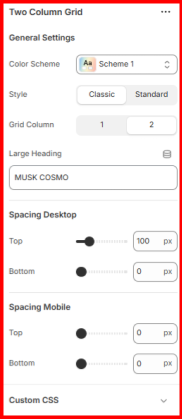
General Settings
- Color Scheme: Use this field to apply a preset color palette to your Two Column Grid section.
- Grid Column: Enables you to specify the number of columns to be rendered by the section. The default is two. Choosing a single column will stack the two grids vertically.
- Large Heading: Enter the header text you want to display as an overlay background behind the section contents.
- Spacing (Desktop and Mobile: Adjusts the top and bottom spacing of the Two Column Grid section on desktop and mobile views.