Location- Customiser > Template > Collection List
Collection Page Overview
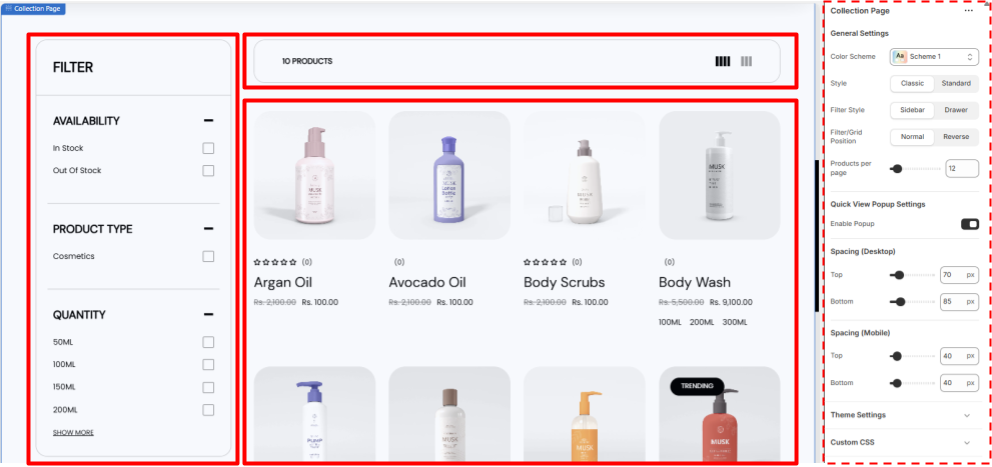
The Collection Page Features all the products related to one particular collection in one page its a collection of some smart features like filters
- Filters- This allow the user to filter out their desired product from the collection, very useful when the product count is high.
- Control bar- A bar above the product list that shows the total count of the products, allows the user to switch between either 3 or 4 columns.
Also allows the user to close or open the filter bar if in Drawer style.
- Product List- All the products in the collection are listed here as cards with their Image as the thumbnail, Their Review stars, Their Name and their Prices, The cards shows quick add or Add to cart option when hovered over.
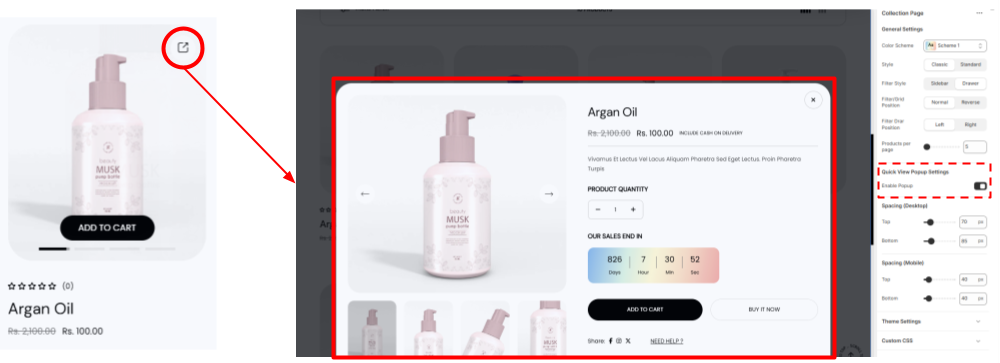
- Quick View Popup- Allow the user to view the product in a popup window without leaving the current page. Works when enabled only
Collection Page Settings
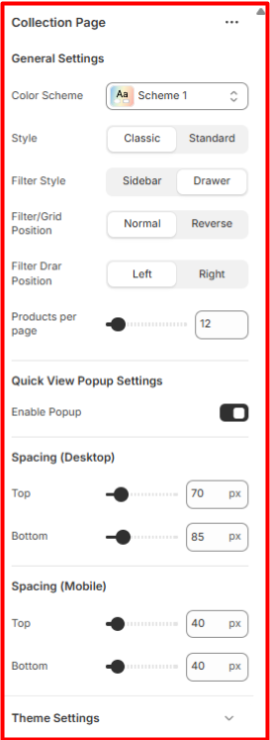
General Settings
- Color Scheme- Select the color scheme you want for this page
- Style- Select the style for the page at classic or standard as per your preference.
- Filter Style- Select how you want the Filters to be there either fixed sidebars or the drawer style triggered from the above Control bar.
- Filter/Grid Position- The Control bar has 3 Visuals when the filter style is in drawer style,
- The More filter option to trigger filter bar.
- The product Count.
- The Column switch for users (3 or 4).
From the filter grid position you can select either to keep the position normal or reverse it.
- Filter Drar Position- Select on which side you want the filter to appear left or right when on Drawer style.
- Products per page- Select the number of product you want to show in one page. (5 minimum)
- Quick View Popup Settings Select either to enable or disable the quick view pop up window