

Location- Customiser > Template > Contact Form
Contact Form Overview
The contact us page allows you the customers to get in touch with you and your business,
This Section has input fields like,
- First name
- Last Name
- Phone Number
- Message
And a Send message button.
Contact Form Settings
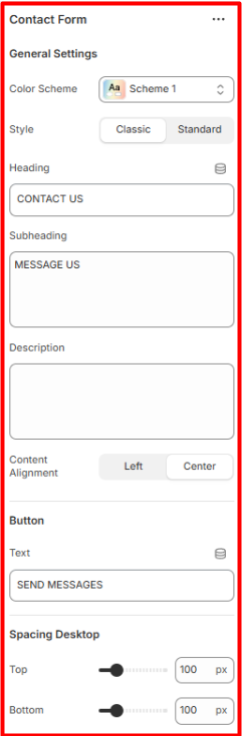
General Settings
- Color Scheme- Set the colour Scheme you want for the section
- Style- Select the classic or the Standard style for the section
- Heading- Add the Heading / Title for this section as you want
- Subheading- Type the Subheading you want the user to read.
- Description- Add further Description about your collection.
- Content Alignment- Select where you want to align the content left or center
Button Settings
- Text- Set the text you want to show over the send button