

Location- Customiser > Template > List Collection
List Collection Overview
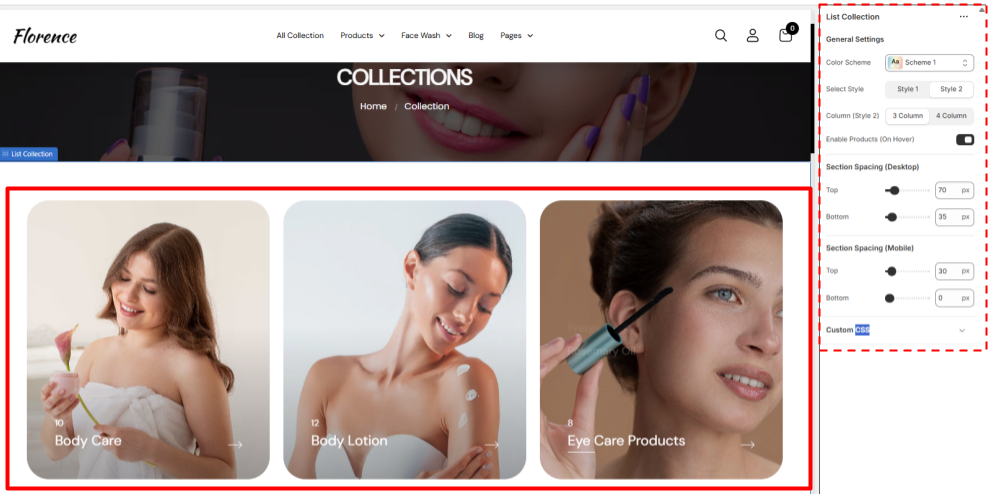
This is a dedicated page to all the collections in your inventory with the format of cards all the collection have their own Thumbnail that appears as the main pic and name in the bottom left corner, with the count of the product above it,
This also have a feature to show the names of the products that falls under the collection that enables when someone hovers over the card (you can either enable or disable it)
The names are clickable and allow the user to redirect directly to the product information page if clicked on the product or if the user clicks on the collection card he will be redirected to the collection page.
All the features here are dynamic except the theme setting and products that appears on hover.
List Collection Settings
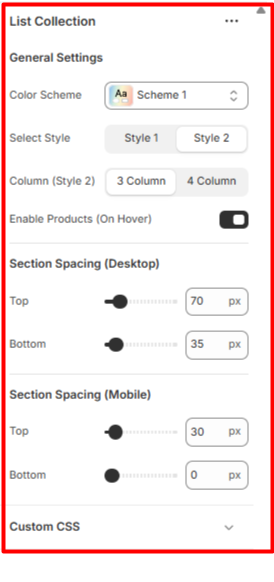
General Settings
- Color Scheme- Set the colour Scheme you want for the section
- Style- Select any of the 2 already given styles for your collection page.
- Column (Style 2)- Select how many columns / cards you want to show on the page in one row at once this only enables for style 2.
- Enable Products (On Hover)- Enable or disable the appearing of product list when you hover on the collection card.