

Location- Customiser > Template > Marquee.
Marquee Overview
The Marquee section is used to display a continuous, looping stream of text, icons, or images that slides horizontally across the screen. It can, for example, be used to announce important notices, sales, or discount codes
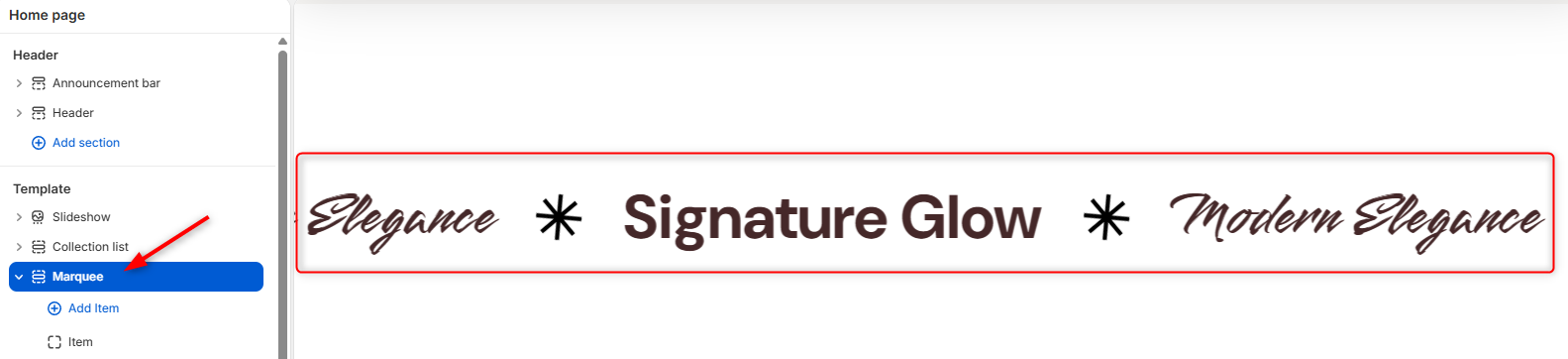
Marquee Settings
General Settings
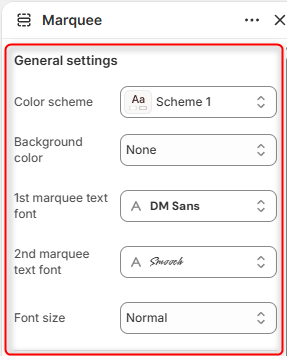
Color scheme: Controls the global color palette (text color, background defaults) applied to the Marquee section.
Background color: Allows you to override the color scheme with a specific background color.
1st marquee text font: Defines the typography family used for the first style of text within the moving marquee.
2nd marquee text font: Defines the typography family used for the alternating or second marquee text.
Font size: Controls the scale/size of the marquee text.
Slider Settings
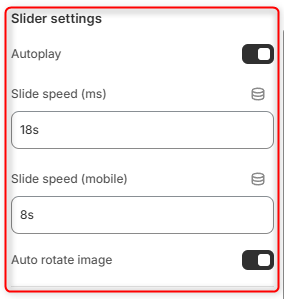
Autoplay: A toggle switch that dictates whether the marquee automatically starts animating across the screen when a user loads the page.
Slide speed (ms): Controls how fast the marquee text scrolls across the screen on desktop displays.
Slide speed (mobile): Controls the scrolling speed specifically for mobile devices.
Auto rotate image: If images or icons (like the star glyphs) are included in the marquee, this toggle determines if they rotate continuously as the text slides.
Spacing (desktop)
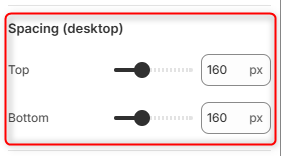
Top: Controls the outer vertical padding/margin space above the marquee section on desktop views.
Bottom: Controls the outer vertical padding/margin space below the marquee section on desktop views.
Spacing (mobile)
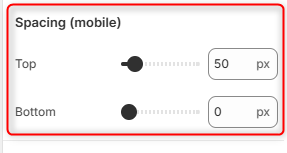
Top: Controls the outer vertical space above the marquee section when viewed on mobile screens.
Bottom: Controls the outer vertical space below the marquee section on mobile screens.