

Location- Customiser > Template > Testimonial
Testimonial Overview
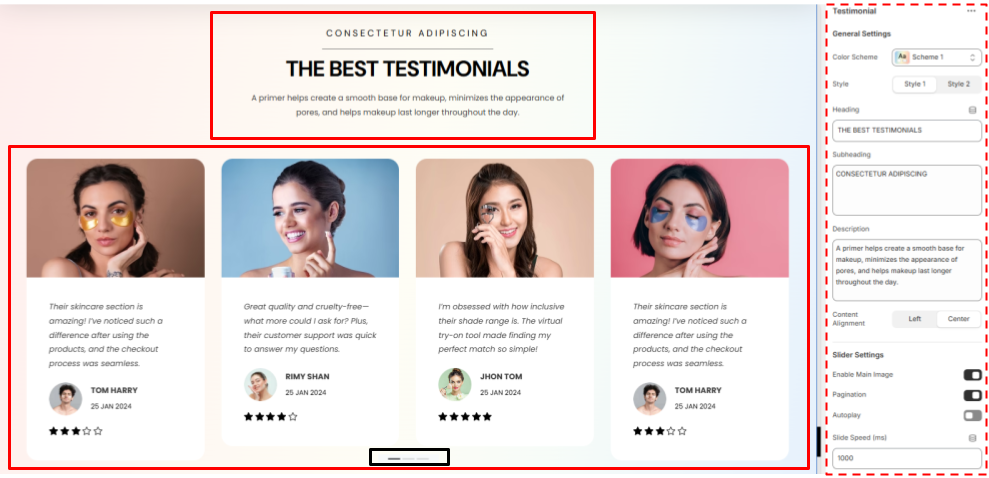
- Heading – A Section for the users to add a title for your Testimonial to put some light on them
- Subheading- A quick introduction about the testimonials you are adding
- Latest Articles- Additional section to further elaborate your the testimonials
- Slider- A slider section to showcase your Testimonials in cards with customised slider settings
Testimonials Settings
General Settings
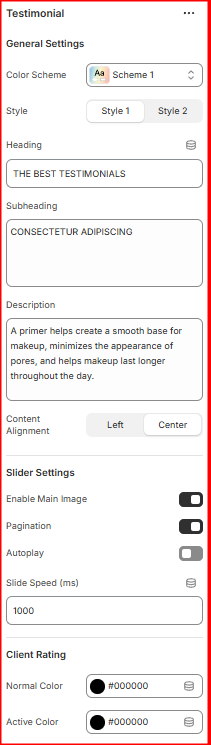
- Color Scheme- Set the colour Scheme you want for the section
- Heading- Add the Heading / Title for the Testimonial Section that you want
- Subheading- Type the Subheading you want the user to read.
- Description- Add further Description about your Testimonials.
- Content Alignment- Set the alignment for the Heading , subheading and the Description text either left or centered.
Slider Settings
- Enable Main Image- Enable or disable the main images of all the slider Items (Testimonial cards) either to show or not, without deleting from the parent card.
- Pagination- Enable or disable the Pagination in the bottom of the section.
- Autoplay- Enable or disable the autoplay of the testimonials.
- Slide Speed (ms)- Set the duration of the autoplay to change the Testimonial slides.
Client Rating Settings
- Normal Color- Select the colour of the Scale of Rating stars as per your preference.
- Active Color- Select the colour of the actual Ratings of the Clients as per your preference.