

Location- Customizer > Cart > Template
Cart Overview
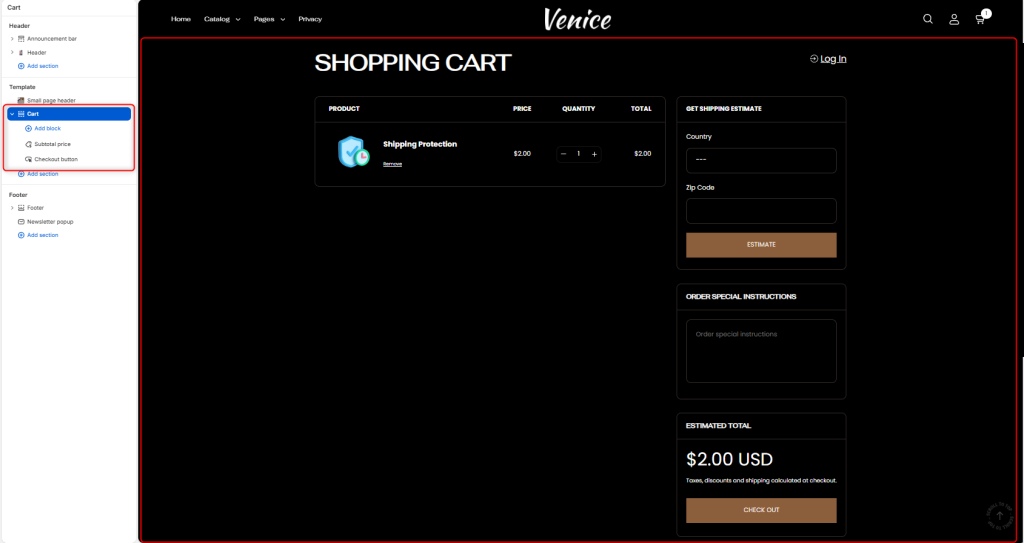
The Cart section controls the appearance and layout of your shopping cart page. It provides customers with an overview of their selected items, allows them to update quantities, review estimated totals, add order notes, estimate shipping costs, and proceed to checkout.
Section setting
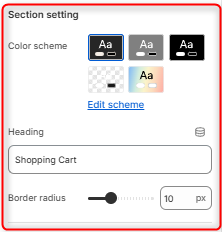
- Color Scheme: Here you can edit and select the color scheme applied to the entire Cart page.
- Heading: Defines the title displayed at the top of the cart page.
- Border radius: Adjusts the corner rounding of cart containers throughout the cart page.
Spacing desktop
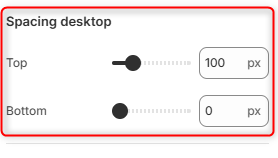
Top: Controls the amount of spacing above the Cart section on desktop devices.
Bottom: Controls the amount of spacing below the Cart section on desktop devices.
Spacing (Mobile)
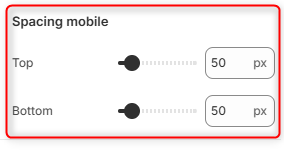
Top: Controls the amount of spacing above the Cart section on mobile devices.
Bottom: Controls the amount of spacing below the Cart section on mobile devices.
Cart Blocks
Subtotal Price
Displays the cart subtotal and estimated order amount. This block mainly helps customers quickly review the value of their cart before checkout.
Checkout Button
This block renders the primary checkout button used to proceed to Shopify’s checkout flow.