

Location- Customiser > Template > Marquee > Image With Text Overlay
Image With Text Overlay Overview

This section is used to display an image or video with descriptive text layered over it.
Image With Text Overlay Settings
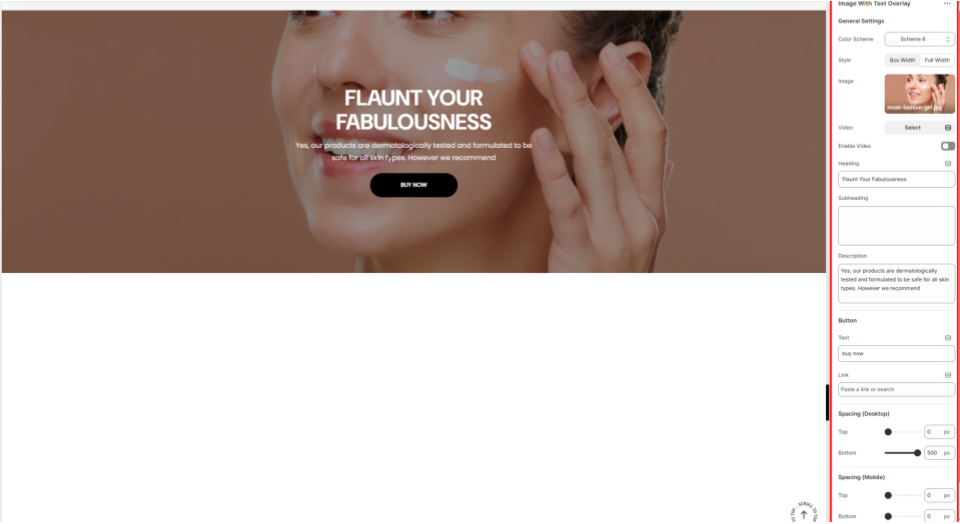
General Settings
- Color Scheme: Enables you to select a predefined color palette to be applied to the section.
- Style: Specify whether to render the image within the section as a boxed or full-width layout.
- Video: Here, you can upload a video to be rendered in the section.
- Enable Video: Toggles the video display on the section instead of the image.
- Heading: Within this field, you can add the main heading to the section.
- Subheading: This field enables you to add supportive text that is rendered above the main section heading.
- Description: Here you can add descriptive text, such as details about your store products.
Button
- Text: Add the label to be rendered on the button.
- Link: Set the URL that the button is to link to once clicked.
Spacing (Desktop and Mobile)
Defines the top and bottom padding of the Image With Text Overlay section in both Desktop and Mobile views.